

Show a question based on an answer
Who can do this: Workspace Owner and Admins
Add a follow-up question that only appears when it’s needed. For example, ask “What was done to make it safe?” only when Safety risk is At Risk.
Add a condition
Section titled “Add a condition”-
In the form’s Form design, click the question the follow-up depends on.
-
Under it, click Add condition.
-
Choose how to match the answer: is, is not or is one of.
-
Choose the answer, for example At Risk.
-
Inside the condition, click Add question and type the follow-up question.
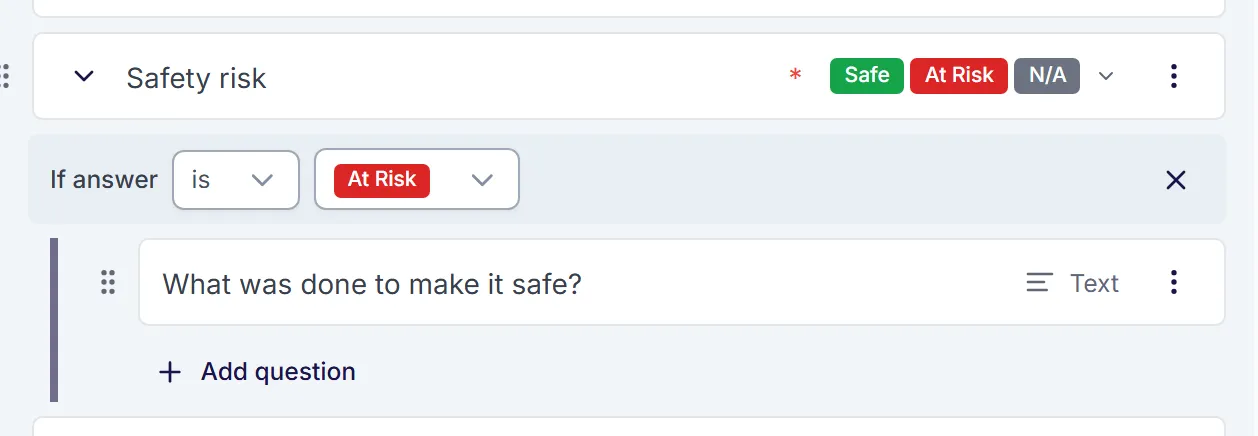
The follow-up question is set up like any other. Click it to choose its answer type and settings.
Follow-up questions can have conditions of their own. You can add more than one condition to the same question, for example a different follow-up for each answer.
Hide or remove a condition
Section titled “Hide or remove a condition”- Click the arrow at the start of the question to hide or show its conditions while you work.
- Click the cross at the end of the condition to remove it.